Honey, I Tiled the Tensors
Shapes, Strides, Swizzles and Suffering! - An intro to Layout Algebra
Layouts are a powerful abstraction introduced in NVIDIA’s CuTe library for making operations on complicated Tensor configurations a little bit easier to understand. My goal here is to provide a good taste of how operations on these layouts work and an example matrix-matrix multiplication kernel to show the value of these abstractions and its drawbacks. This is not a full mathematical analysis of Layouts, for that a good reference is the official paper by CuTe’s creator Cris Cecka, “CuTe Layout Representation and Algebra”, or the earlier community note “A note on the algebra of CuTe Layouts”
GPUs don’t know about tensors and their structures, operations are only performed on linear memory. Tensor structures need to be maintained by the kernels themselves. e.g. for a row-major matrix the matrix indices i, j will become index i*C + j where C is the number of columns. These kinds of mappings are pivotal in building GPU kernels since the shapes and structures of tensors can get very complicated.
A Layout we can easily define as nothing but a combination of the shape and stride (num of jumps to go from one element to next in a dimension) of a Tensor. It defines a mapping from the Tensor coordinate space to a flat array layout indices. Here stride and shape are tuples of matching dimensions. Calling the shapes and the strides we say
For example lets start with matrices, a row major matrix will be represented as . Here we can see that increasing the first dimension (row) coordinate by will increase the flat index by and the second dimension (column) only increases it by . For getting the flat index/offset given , , we know we can get it by . Or more generally we can see from how stride is defined that the flat index given indices and stride ,
Similarly the column-major matrix represented as . Layouts can themselves be again made out of other Layouts. Lets analyze an example; . Okay! Lets try some coordinates.
| Coordinate | Calculation | Physical Offset |
|---|---|---|
| 0 | ||
| 4 | ||
| 1 | ||
| 5 | ||
| 2 | ||
| 6 | ||
| 3 | ||
| 7 |
As we can see this is an interleaved layout (or swizzled). These kinds of layouts are generally used in GPU kernels to prevent memory bank conflicts.
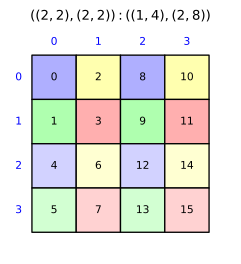
This is okay, but it is inconvenient to do offset calculations of a particularly complex layout. Another way of visualizing this is to think about the groups individually first has a stride of creating a and this is repeated again in a shape with each block in a layout. This can be seen by factorizing the expanded .
This reduces a 4D layout into a 2D layout which is easy to visualize. But this is not possible for all layouts.
Layouts can also be operated on. This is the algebra part of the layout algebra. So we can have functions that can map from one layout to another layout. Such a function is equivalent to mapping of one flat index space to another. Hence
Lets go through a few of these operations.
Coalescing#
Coalescing is to simplify a layout. More formally, we can define Rank of a layout as the number of modes it has, coalesce operation reduces the number of modes i.e. to reduce its Rank. For example the layout is the same as for 1-D coordinates. So how do we get a coalesced layout? Say we have a layout , (no nesting) how do we reduce a pair of layouts into one layout? We can check if the two modes are contiguous. When are they contiguous? When the next layout has a stride equaling the total flat indices of the former layout. This way they line up perfectly. so for and can reduce iff.
and the two modes merge into . We can also see that shape is an identity in reduction. i.e. and reduce to . This is useful when we need to simplify some particularly gnarly tensor layouts. Coalescing can also be done by-mode i.e. we can only reduce some ranks e.g. from .
Composition#
Composition chains two layouts together. Given a layout and a layout , the composition creates a new layout that first maps coordinates through and then uses those resulting indices as coordinates into . In other words, the output indices of become the input coordinates of .
Why is this useful? Composition is fundamental to the concept of tiling, where we partition a large data into smaller chunks that can be loaded into GPU’s Shared Memory or further into Register Memory. We can do this with the composition operation as we’ll see in later sections.
Lets work through an example. Take and . Layout maps 2-D coordinates to 1-D indices in a arrangement. Layout maps a 1-D coordinate to offsets . The composition should give us a layout that maps 2-D coordinates directly to the physical offsets.
| Coordinate | ||
|---|---|---|
We can verify this is the layout . Now lets build up the general composition rules.
Single-mode #
In the simple case where is a single mode, composition just scales the strides of by :
This works because is linear — — so . This is the case we saw in the example above: .
Single-mode #
When has multiple modes, the output of needs to be decomposed into coordinates for . Given and , the flat indices from (which are ) are split across ‘s modes using its shapes. This can only be done if either or . Without this, ‘s indices don’t cleanly align with ‘s mode boundaries and composition is undefined.
There are two cases:
Case 1: (stride skips past first mode). Since is a multiple of , every index has , so ‘s first mode coordinate is always zero. We skip it entirely and recurse with reduced stride:
Case 2: (stride fits within first mode). Let . The first indices from cycle through ‘s first mode before overflowing into the next.
- If : all indices fit in the first mode. Result:
- If and : the first mode fills completely, and the rest recurse: 1
Lets trace through a concrete example. Take and .
We have and . Since , we’re in Case 2 with . Since and :
For the recursive step, and , so and :
Combining: .
General composition: left-associative reduction#
For the fully general case where both and are multi-mode, we reduce it to the cases above by processing ‘s modes left to right. Given , we compose each mode of one at a time (due to 1):
Each single-mode composition consumes some of ‘s leading modes (via the cases above), and the unconsumed remainder carries forward for the next mode of .
Composition of a Layout with a smaller Tile layout gives us a single first Tile from the original layout, we need some operation that can also do this for the rest of the layout.
Complement#
Composition is always a subset of indices from the index space of , what about the leftovers? This is where the complement operation comes into the picture. Complement is done with respect to a size , i.e. given a layout the complement , is the layout that fills up the rest of indices not covered by . Complement only makes sense if the gaps left in indices is shaped for filling up the space perfectly with a layout. For a layout , this means and . This means that the inner strides should fit into outer strides. We can calculate the complement of as.
Here is an example for complement. Note we can reduce the from this example. The gray part is the original layout and colored indices

Division#
Division operation splits a layout into equal-sized tiles defined by layout . As we have seen previously we can compose a layout and a tiler to get the first tile but to get all of them we need to also compose the complement with respect to a size to get the rest of them.
This splits each mode of into two: the first mode is within tile from the composition and the second mode is indexing across tile from the complement. For a mode of with shape and stride , and tiler shape , we get
- Within-tile: shape , stride
- Across-tiles: shape and stride .
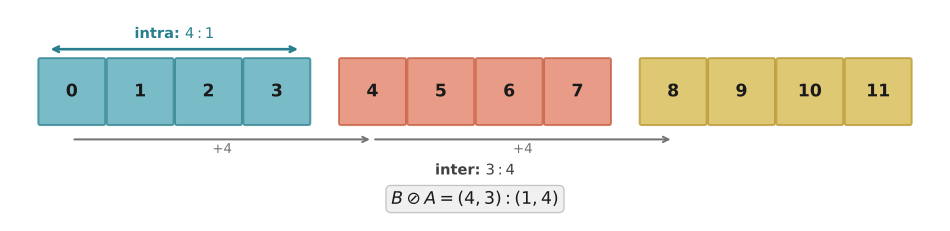
The original mode becomes a pair: . This operation doubles the Rank of the layout. Lets work through a few examples, first a simple 1D case. and , should divide into 3 pieces. Hence;
Complement: (the 3 tile offsets: ).
Concatenating: .
Composing: .
The first mode (size 4, stride 1) = within-tile indices . Second mode (size 3, stride 4) = tile offsets . Three tiles of four elements each, covering all 12.
Lets also work through a 2D example (4x6 column-major matrix), tiler (2x3 tiles). Mode-by-mode:
- Mode 0: shape 4, tiler 2 → — 2 rows in-tile, 2 tile-rows
- Mode 1: shape 6, tiler 3 → — 3 cols in-tile, 2 tile-cols Logical divide result:
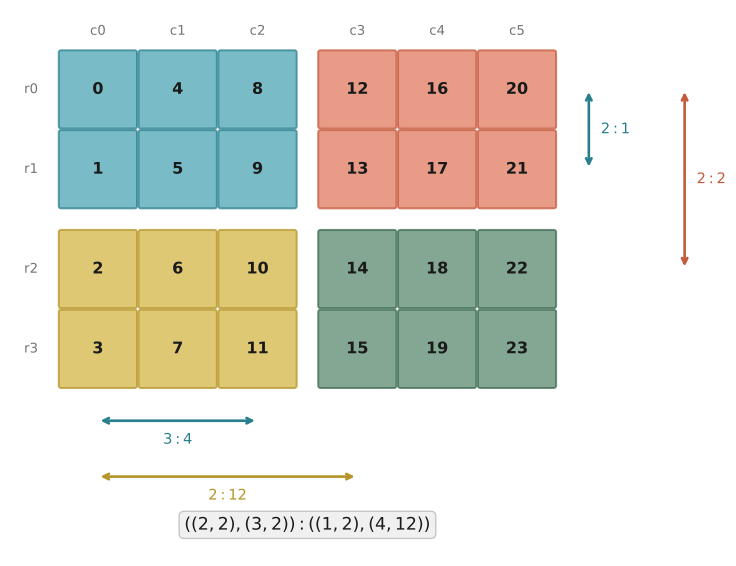
This is rank-4. Each original mode became a nested pair of .
This layout is difficult to work with due to its nesting, we can reduce it to easier layouts
Zipped, Tiled and Flat Divides#
These are just convenience representations of the logical divide operation. Lets say a layout has shape and a tiler with shape . The convenience forms are as below
- Logical:
- Zipped:
- Tiled:
- Flat:
Tiled Divide is especially interesting, it regroups the modes by role: all intra-tile modes together, all inter-tile modes together. The result is a clean two-level hierarchy — first group is “what’s inside a tile,” second group is “which tile.” This is the workhorse form that local_tile and partition_* use under the hood. It’s what you want when different parts of the kernel need to reason about tiles independently — the CTA picks its tile via the inter-tile mode, then threads work within it via the intra-tile mode.
Product#
Where division breaks a layout into tiles, product does the opposite — it replicates a layout to fill a larger space. Given a layout (the atom to replicate) and a layout (the replication pattern), the product is
The result is a two-mode layout: mode 0 is the atom itself and mode 1 is which describes how the copies of are arranged. The complement finds the gaps between elements of , and composing with maps the replication pattern into those gaps.
Lets work through a 1D example. Take (a contiguous atom of 4 elements) and (replicate 3 times).
First we need the complement of with respect to . We get — the three offsets where copies begin.
So the product is . Notice anything? This is the same layout we got from dividing by . That’s the duality — division splits a layout into tiles, product builds one up from tiles. Two sides of the same coin.
Where product really shines is building thread-value layouts for distributing work across GPU threads. Say we have 4 threads each handling 2 values. The thread layout and value layout , the product tells us which elements each thread owns.
, so . The product is .
Thread 0 handles elements , thread 1 handles and so on — each thread’s values are spaced apart by the number of threads. This cyclic distribution is exactly what CuTe’s make_tiled_copy_tv builds internally from a thread layout and value layout.
Blocked and Raked Products#
For multi-dimensional layouts, the logical product works mode-by-mode just like division. Given atom with shape and replication pattern with shape , the result has structure where denotes the replica modes. Blocked and raked products are two ways of reassociating these modes.
Blocked product groups like-modes with the atom inside: . Each atom occupies a contiguous block and replicas tile these blocks across the space. Think of it as “each thread gets a contiguous rectangle of elements.”
Raked product reverses the nesting: . The replicas interleave within the atom dimensions, creating a cyclic distribution. Thread 0 gets element 0, thread 1 gets element 1, wrapping around. This is the classic GPU pattern for coalesced memory access — adjacent threads access adjacent memory locations.
Zipped and Tiled Products#
Same convenience regrouping as with division. Given a layout with shape and tiler with shape :
- Logical:
- Zipped:
- Tiled:
- Flat:
Putting it all together#
Now lets see how all these layout operations come together in a real tiled GEMM kernel using CuTe’s Python DSL. We compute where is , is (stored as , i.e. row-major transposed), and is . The kernel tiles across all three dimensions with block tile sizes .
Setup and Tiled Copies#
First we define shared memory layouts and tiled copy operations for moving data from global memory (GMEM) to shared memory (SMEM):
# Shared memory layouts - column-major for vectorized MMA access
sA_layout = cute.make_layout((b_m, b_k))  # (b_m, b_k) : (1, b_m)
sB_layout = cute.make_layout((b_n, b_k))  # (b_n, b_k) : (1, b_n)

# Thread layout for copy A: threads distributed across k-major order
tA = cute.make_layout(
    (num_threads // b_k, b_k), stride=(b_k, 1)
)
copy_atom_A = cute.make_copy_atom(
    cute.nvgpu.cpasync.CopyG2SOp(), dtype,
    num_bits_per_copy=dtype.width,
)
tiled_copy_A = cute.make_tiled_copy_tv(
    copy_atom_A, thr_layout=tA, val_layout=cute.make_layout((1, 1))
)

# Thread layout for copy B: with vectorized loads along n-major
num_vectorized = 4  # elements per vectorized load
copy_atom_B = cute.make_copy_atom(
    cute.nvgpu.cpasync.CopyG2SOp(), dtype,
    num_bits_per_copy=dtype.width * num_vectorized,
)
major_mode_size = b_n // num_vectorized
tB = cute.make_layout(
    (major_mode_size, num_threads // major_mode_size),
    stride=(1, major_mode_size),
)
tiled_copy_B = cute.make_tiled_copy_tv(
    copy_atom_B, thr_layout=tB,
    val_layout=cute.make_layout((num_vectorized, 1))
)
The make_tiled_copy_tv function takes a copy atom (the hardware copy instruction), a thread layout (how threads are mapped to tile elements), and a value layout (how many elements each thread copies per invocation). This is where layout composition shines — CuTe composes these layouts to determine exactly which elements each thread is responsible for copying.
MMA Setup#
The tiled MMA is set up similarly. We distribute threads in a layout across the M, N, K modes:
atoms_layout_mnk = cute.make_layout(
    (num_threads // 16, 16, 1), stride=(16, 1, 0)
)
tiled_mma = cute.make_tiled_mma(
    cute.nvgpu.MmaUniversalOp(abacc_dtype=acc_dtype),
    atom_layout_mnk=atoms_layout_mnk,
)
The Kernel#
Inside the kernel, we first use local_tile to carve out each thread block’s portion of the global tensors. The proj argument selects which modes the block tiler applies to:
bidx, bidy, _ = cute.arch.block_idx()
cta_coords = (bidx, bidy, None)

# gA: (b_m, b_k, k_tiles), gB: (b_n, b_k, k_tiles), gC: (b_m, b_n)
gA = cute.local_tile(mA, block_tiler, cta_coords, proj=(1, None, 1))
gB = cute.local_tile(mB, block_tiler, cta_coords, proj=(None, 1, 1))
gC = cute.local_tile(mC, block_tiler, cta_coords, proj=(1, 1, None))
Then we partition the tiles across threads for both copying and computation:
tidx, _, _ = cute.arch.thread_idx()
thr_mma = tiled_mma.get_slice(tidx)

# Partition copy source (GMEM) and destination (SMEM) for each thread
thr_copy_A = tiled_copy_A.get_slice(tidx)
tAgA = thr_copy_A.partition_S(gA)  # (cpy, cpy_m, cpy_k, k_tiles)
tAsA = thr_copy_A.partition_D(sA)  # (cpy, cpy_m, cpy_k)

thr_copy_B = tiled_copy_B.get_slice(tidx)
tBgB = thr_copy_B.partition_S(gB)  # (cpy, cpy_n, cpy_k, k_tiles)
tBsB = thr_copy_B.partition_D(sB)  # (cpy, cpy_n, cpy_k)

# Partition SMEM and output for MMA
tCsA = thr_mma.partition_A(sA)
tCsB = thr_mma.partition_B(sB)
tCgC = thr_mma.partition_C(gC)
tCrC = tiled_mma.make_fragment_C(tCgC)
tCrC.fill(0.0)
Each partition_* call internally uses layout composition and division to split the tile into per-thread pieces. The cpy mode in the copy partitions captures both the vectorization width and the number of copy operations each thread performs.
The Main Loop#
The k-tile loop copies each and tile from GMEM to SMEM using async copies, then performs the MMA:
k_tiles = cute.size(tAgA, mode=[3])

for k in range(k_tiles):
    cute.copy(tiled_copy_A, tAgA[None, None, None, k], tAsA, pred=tApA)
    cute.copy(tiled_copy_B, tBgB[None, None, None, k], tBsB, pred=tBpB)

    cute.arch.cp_async_commit_group()
    cute.arch.cp_async_wait_group(0)
    cute.arch.sync_threads()

    cute.gemm(tiled_mma, tCrC, tCsA, tCsB, tCrC)
    cute.arch.sync_threads()
The pred arguments handle boundary conditions — when M, N, or K aren’t exact multiples of the tile sizes, predicate tensors mask out-of-bounds accesses. These predicates are themselves built using layout operations on identity tensors.
Epilogue#
Finally the accumulated results are written back to global memory, again with predication for bounds checking:
cC = cute.make_identity_tensor(gC.shape)
tCpC = thr_mma.partition_C(cC)
predC = cute.make_rmem_tensor(tCrC.layout, cutlass.Boolean)
residue_m = mC.shape[0] - b_m * bidx
residue_n = mC.shape[1] - b_n * bidy
for i in range(cute.size(tCrC.shape)):
    predC[i] = cute.elem_less(tCpC[i], (residue_m, residue_n))
atom = cute.make_copy_atom(cute.nvgpu.CopyUniversalOp(), mC.element_type)
cute.copy(atom, tCrC, tCgC, pred=predC)
The full kernel is available in the companion repo.
Notice how the layout algebra permeates the entire kernel — from defining how threads map to data (make_tiled_copy_tv), to carving tiles (local_tile), to splitting work across threads (partition_*), to bounds checking (make_identity_tensor + elem_less). Without these abstractions, we’d be manually computing thread-to-element mappings with error-prone index arithmetic. The layout algebra replaces all of that with composable, type-safe operations.
Closing thoughts#
CuTe’s layout algebra turns what would be pages of error-prone index arithmetic into a handful of composable operations — composition, complement, and division — that are easier to reason about. But I want to be honest about the tradeoff here.
GPU memory layouts are inherently complex. Swizzled shared memory, bank conflict avoidance, mixed-radix thread-to-data mappings — this complexity is intrinsic to the hardware. CuTe doesn’t eliminate it; it repackages it into a different formalism. You’re trading one kind of complexity (raw index math) for another (an algebra with its own rules, edge cases, and debugging challenges). As one Reddit commenter put it, CUTLASS is “a typical example of a library with so much abstractions that makes complicated things simple and simple things complicated.”
The learning curve is steep. You need to internalize layouts, composition, complement, division, cosize, cotarget, tiled copies, MMA atoms — a whole vocabulary before you can write your first kernel. For someone who already understands raw CUDA well, the value proposition is debatable: you’re investing significant effort to learn abstractions that, at the end of the day, generate the same PTX. The payoff comes when you need to support multiple GPU architectures, swap out MMA instructions, or restructure tiling strategies without rewriting everything — that’s where the composability genuinely shines. But for a one-off kernel on a single architecture, you might be better off with raw CUDA and a good understanding of your hardware.
If you want to dig deeper, Cris Cecka’s “CuTe Layout Representation and Algebra” is the definitive reference — it formalizes everything covered here and more, including inversion and cotarget. The CuTe documentation is thorough, and the CUTLASS Python DSL makes it easier to experiment with these ideas interactively — the Python interface significantly reduces the compile-time pain that plagues the C++ templates.